
Play with sound
01 / Sunset Court Trio
Chipmunks Dance AI
- up to 3 photos
- $9.98 · one time
The chipmunks dance trend — one photo of you, or all three of you.
Create ↗Upload one photo and get the chipmunks dance trend with your face: the same three-person routine as the viral TikToks, on a sunset court. Add a friend or two if you like — still one price. 15 seconds, vertical, with the speed-up song.
Your photo is the middle dancer. Add up to two friends if you like — one photo each, and the other two spots stay as they are.
Strictly prohibits adult / NSFW content
$9.98 one time15s · 9:16 · 720pNo subscription
One slot per person. The number is the reference the model matches against the clip, and the frame in each upload box is the person your photo takes the place of. Leave a slot empty and the performer already in the clip stays exactly as they are.
We send the download link here. Your clips stay on this page either way.
One-time payment. No subscription. AI-generated — an independent fan tool, not affiliated with, endorsed by, or sponsored by any film, cartoon or music rights holder.
The prepared scene
Sunset Court Trio — prepared scene
The choreography, the lighting and the camera work come from the scene. Your photos take the faces in the prepared clip.
1 to 3 photos, one person or pet each (JPG, PNG or WebP)
15 second video, 9:16, 720p, no watermark
1 to 3 people at the same price — the middle dancer is required
Image-to-video generation
Yes — the speed-up audio of the prepared clip
5–8 minutes
One-time payment, no subscription
Direct download, plus your order history
Chipmunks Dance AI is an image-to-video generator that puts your face into the chipmunks dance trend — the three-person TikTok routine where dancers copy the singing chipmunks from an animated film, move for move, on a speed-up remix of Dead or Alive's 1984 hit You Spin Me Round (Like a Record). Your photo becomes the middle dancer; add up to two more photos for the right and left dancers, or leave them out and the clip keeps its own AI-generated dancers. The output is a 15-second 9:16 video at 720p. Every clip is AI-generated, and the tool has no connection to any film, cartoon or music rights holder.
The chipmunks dance is a three-person TikTok dance built on a speed-up remix of Dead or Alive's 1984 hit You Spin Me Round (Like a Record). The dancers copy the routine the singing chipmunks do in an animated film — hip shakes, spins, and a turn at the front for each of the three — which is why it fits any trio. It started in mid-October 2026 and spread fast: a trio posted by @athena_c on 17 October passed 18 million views in two weeks. Between 23 and 29 October came versions from @iamestamerr (7.5 million views), @bopleandjo (5.5 million) and a Halloween trio from @kimberlykimpenca (5.3 million). On 30 October a tutorial for a one-photo AI template of the dance reached 1.2 million views in a day and a half, and searches for chipmunks dance ai began. The AI trend grew out of that: photo-to-video templates that put your own face in the routine.
Read the source ↗The court, the sunset, the choreography, the camera work and the sped-up song all come from the prepared clip. You supply the faces.
Your photo is the middle dancer. Add a photo for the right dancer, the left dancer, or both — every spot without a photo keeps the dancer already in the clip.
One adult, or one pet, per photo. Write what that one should wear under its own photo and it applies to that one alone.
No subscription, no credits that expire, no editing app, no account to create. One video, one price.
The prepared clip — your photos take the faces of the three dancers.
Three dancers on an outdoor court at sunset — hips and arms on the beat, then a spin and a change of places, with each of them taking a turn at the front. The performance and the framing are already filmed; the faces are yours.
The clip is already filmed — three dancers on an outdoor court at sunset, hips and arms on the beat, then a spin and a change of places, with each of them taking a turn at the front. Each photo takes one dancer. The frame under each spot is cut from the clip itself, so you can see who that spot already is. Leave a spot empty and the dancer in the clip stays as they are — never a stranger.
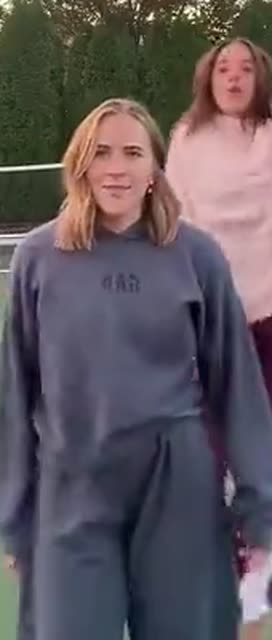
Opens the clip in the middle of the line, in the dark sweatsuit. Your photo is this dancer.
Your photo takes this person’s place.
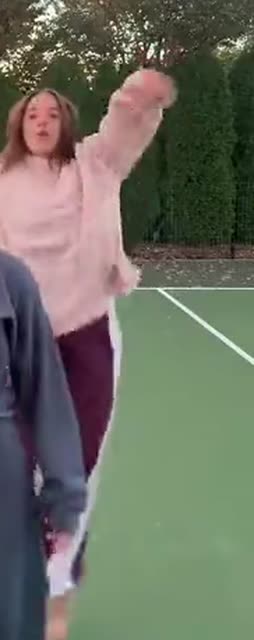
Stands on the right in the light hoodie, and cuts to the front a few seconds in.
Your photo takes this person’s place.
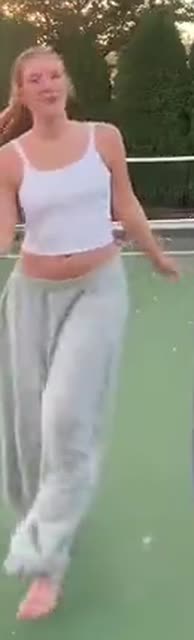
Stands on the left in the white top, at the back of the line for most of the clip.
Your photo takes this person’s place.
One clear photo for the middle dancer: one adult, face to the camera, well lit. Add a photo for the right or left dancer if you have friends in mind.
Under any photo, write what that dancer should wear or look like. Leave it empty and the photo goes in exactly as it is.
A single fee covers the whole clip, whether you put one face in it or three. Most renders land in five to eight minutes — close the tab, the file waits on your order page.
A dance-clip workflow starts from an existing performance; a photo-to-video workflow creates footage around an image. Compare the required inputs and the intended result below — this is a workflow comparison, not a claim that every competing service behaves alike.
| Your workflow | This dance-clip workflow | A photo-to-video workflow |
|---|---|---|
| Video input | An existing performance clip plus face references | A photo and instructions for new footage |
| Performance | Aim to retain the source actions, bodies and outfits | The model generates a performance |
| Other people | Every dancer in the clip is assigned one photo each | People depend on the generation brief |
| Framing and timing | Taken from the source; output options need confirmation | Depend on the model and the request |
| Song | The sped-up audio of the prepared clip | Depends on the service's audio generation |
| Cost | One payment per clip, no subscription | Often a subscription or a credit pack |
| Wait | About five to eight minutes, and we email you when it is done | Varies by tool and clip length |
Create your Chipmunks Dance AI video for $9.98. One vertical clip with the routine, the court and the camera work already filmed, rendered in about five to eight minutes. One face or three, the same price. No credit packs, no subscription, no account.
Refunds ↗One-time payment
$9.98/ video
One-time payment. No subscription. AI-generated — an independent fan tool, not affiliated with, endorsed by, or sponsored by any film, cartoon or music rights holder.
Rendered by Kling 4.0 (Kuaishou).
Chipmunks Dance AI is a photo-to-video generator that puts your face into the chipmunks dance trend — the three-person TikTok routine on a sunset court. You upload one photo for the middle dancer, add up to two more for the right and left dancers, and the prepared clip supplies the court, the choreography, the camera work and the sped-up song. You get a 15-second 9:16 video back.
It is a three-person TikTok dance set to a speed-up remix of Dead or Alive's 1984 hit You Spin Me Round (Like a Record). The three dancers copy, move for move, the routine the singing chipmunks do in an animated film: hip shakes, spins, and a turn at the front for each of them. It went wide in October 2026, when a trio version by @athena_c passed 18 million views in two weeks.
Between one and three. The middle dancer's photo is the only one required — the right and left dancers are optional, one photo each. Any spot you leave empty keeps the dancer already in the clip, so no real stranger ends up next to you.
Yes. Every slot takes a pet as readily as a person — a cat, a dog, whatever you have. Write what that one should wear under its own photo, and leave it empty to keep the outfit it already has.
By the slot you upload them into. The first photo becomes the middle dancer, the second the right dancer and the third the left dancer. The clip itself decides the order and the timing; your photos follow it.
No. Chipmunks Dance AI is an independent fan tool. It is not affiliated with, endorsed by, or sponsored by any film, cartoon or music rights holder, it contains no cartoon characters, and every clip it produces is AI-generated.
Yes — the clip carries the sped-up audio of the prepared scene it was generated from, and that audio comes as part of the download. It is not a separate music licence, so if you post the clip publicly, keep the credit the original post carried.
15 seconds, cut for TikTok, Reels and Shorts at 9:16. The length follows the prepared routine, so the framing and the timing stay on the beat.
One clear photo of one person or pet per spot, facing the camera, face sharp and reasonably large in frame, with a plain background. The face has to survive 15 seconds of movement — a small or blurred face gets reinvented by the model and the reinvention drifts.
Yes. Under any photo, write what that dancer should wear or look like — a white tank, a suit, a new hairstyle, a different coat on the pet. That instruction applies to that one alone.
$9.98 for one video, paid once. There is no subscription and no credit pack that expires, and one video costs the same whether you put one face in it or three.
No editing software is needed. The routine, the court, the camera angle and the timing are already in the clip. You upload a photo, pay once and download a finished 9:16 video ready to post.
Yes, you should. TikTok requires realistic-looking synthetic content of people to be labelled, and the label does not reduce reach — videos carrying it routinely outperform unlabelled ones.
Yes, and that is the point of the middle slot. One photo gives you the middle dancer in the line; the other two spots stay as they are in the clip. Add two more photos and the whole trio is yours.
Which spot each photo takes, what the camera does, and how to post it.
Make the chipmunks dance ↗One to three photos, one per dancer — what the model keeps, and how to write the outfit line.
Pick the right photos ↗A speed-up remix of You Spin Me Round (Like a Record), released by Dead or Alive in 1984. The dance trend reuses that remix rather than the original track, and the clip you get carries the same sped-up audio.
Three dancers on an outdoor court at sunset: hips and arms on the beat in a line, then the right dancer cuts to the front and all three spin and trade places, then the middle dancer comes up to the camera for a close-up. The AI version keeps that motion and the framing of the prepared clip — your photos change the faces, not the routine.
Because each dancer takes a turn at the front, and the routine is copied move for move from the singing chipmunks in an animated film. The version that spread on TikTok in October 2026 was shot as a trio, and the copies — sisters, roommates, a Halloween costume group — kept that format.
Upload one clear photo for the middle dancer, add one for the right or left dancer if you like, pay the single fee and wait about five to eight minutes. The result is a 15-second 9:16 video at 720p, ready to download.
Yes. One photo is enough — your face becomes the middle dancer and the right and left spots keep the dancers already in the clip. Every extra photo is optional and costs nothing extra.
One person or pet per photo, facing the camera, face sharp and clearly lit, with a plain background behind them. The face is what has to survive 15 seconds of movement, so a small or blurred face gets reinvented by the model.
Your photo is the character reference, so the model keeps your face and body consistent through the clip rather than pasting a still photo on top. It is still a generated video, so details shift slightly between renders — that is the model working, not a defect.
The clip runs 15 seconds, which is the length of the prepared routine. The full TikTok routine is longer than that, but every extra clip on this site is a separate payment.
No. One clip is $9.98, paid once. There is no free tier, no subscription and no credit pack that expires.
Yes, as long as that person agreed to it. Use a photo of yourself, or of someone who has agreed to have their likeness used — and if the person is under 18, their parent or legal guardian has to have authorised it.
Download the 9:16 file and post it vertical. Turn on TikTok's AI-generated content label before you post, and describe it as a trend-inspired clip rather than an official release — the label costs you nothing in reach and keeps you on the right side of the rules.
5 video generators across our trend sites. Open any of them, upload your photos and pay once — every clip comes back ready to post.
The chipmunks dance trend — one photo of you, or all three of you.
Create ↗Your band at the little desk. One photo is enough.
Create ↗One upload, one payment, 15 seconds of the routine everybody is doing this season.
Make my chipmunks dance